[warning]阿里云函数已经于2024年1月5日开始收费,首次启用云函数可免费试用三个月[/warning] 可以使用Vercel代替阿里云函数免费解除限制,可以查看利用Vercel免费解除b站区域限制一文 准备 你需要一个阿里云的账号并完成实名认证 开始 创建服务 首先进入阿里云函数计算,点击侧边栏服务和函数 选择当前区域为中国(香港) 创建服务,名称随意,剩下的默认即可 创建函数 进入刚刚创建的服务,点击左上创建函数 选择使用标准的 Runtime 从零创建,函数名称随意,请求处理程序类型选择处理 HTTP 请求 运行环境选择 PHP7.2,代码上传方式默认即可 配置函数 在高级配置里选择弹性实例,内存规格 128MB,执行超时时间 15 秒,别的无需修改,直接创建即可 编辑函数 进入函数详情页,将下面代码替换原有的代码,然后点部署函数 `getBody()->getContents(); $queries = $request->getQueryParams(); $method = $request->getMethod(); $headers = $request->getHeaders(); $path = $request->getAttribute('path'); $requestURI = $request->getAttribute('requestURI'); $clientIP = $request->getAttribute('clientIP'); */ /* Config */ $upstream_pc_url = 'https://api.bilibili.com/pgc/player/web/playurl'; $upstream_app_url = 'https://api.bilibili.com/pgc/player/api/playurl'; $upstream_pc_search_url = 'https://api.bilibili.com/x/web-interface/search/type'; $timeout = 5; // seconds /* Read incoming request */ $request_method = $request->getMethod(); $request_query = substr(stristr($request->getAttribute("requestURI"), '?'),1); //$request->getHeaderLine('referer')会被阿里云替换成云函url //$req_referer = $request->getHeaderLine('referer'); $req_referer = "https://www.bilibili.com"; $request_headers = $request->getHeaders(); $request_body = $request->getBody()->getContents(); $request_uri = $request->getAttribute('requestURI'); /* Forward request */ $ch = curl_init(); //处理请求相关header $request_headers = array_remove_by_key($request_headers,'X-Forwarded-Proto'); $request_headers = array_remove_by_key($request_headers,'Host'); $request_headers = array_remove_by_key($request_headers,'Referer'); //配置body压缩方式 $request_headers = array_remove_by_key($request_headers,'Accept-Encoding'); curl_setopt($ch, CURLOPT_ENCODING, "identity");//好像b站只有br压缩 $headers = array(); foreach ($request_headers as $key => $value) { $headers[] = $key . ": " .implode($value); } //判断请求接口 if(substr_count($request_uri,'/search/type')!=0){ $url = $upstream_pc_search_url . '?' .$request_query; curl_setopt($ch, CURLOPT_REFERER, $req_referer); }elseif (substr_count($request_uri,'playurl')!=0){ //判断使用的那个pc还是app接口 if(substr_count($request_query,'platform=android')!=0){ $url = $upstream_app_url . '?' .$request_query; curl_setopt($ch, CURLOPT_USERAGENT, 'Bilibili Freedoooooom/MarkII'); }else{ $url = $upstream_pc_url . '?' .$request_query; curl_setopt($ch, CURLOPT_REFERER, $req_referer); } }else{ $header['Content-Type'] = 'text/plain'; return new Response( 502, $header, 'Failed to match interface.' ); } //curl配置 curl_setopt($ch, CURLOPT_TIMEOUT, $timeout); curl_setopt($ch, CURLOPT_CUSTOMREQUEST, $request_method); curl_setopt($ch, CURLOPT_URL, $url); curl_setopt($ch, CURLOPT_HTTPHEADER, $headers); curl_setopt($ch, CURLOPT_POSTFIELDS, $request_body); curl_setopt($ch, CURLOPT_HEADER, true); curl_setopt($ch, CURLOPT_FOLLOWLOCATION, false); curl_setopt($ch, CURLOPT_RETURNTRANSFER, true); $response = curl_exec($ch); $header = array(); if ($response === false) { $header['Content-Type'] = 'text/plain'; return new Response( 502, $header, 'Upstream host did not respond.' ); } else { $header_length = curl_getinfo($ch, CURLINFO_HEADER_SIZE); $response_headers = explode("\n", substr($response, 0, $header_length)); $response_body = substr($response, $header_length); //处理返回相关header foreach ($response_headers as $n => $response_header) { //配置返回的body压缩方式 if (strpos($response_header, "Content-Encoding") !== false) { $response_headers[$n] = "Content-Encoding: identity\n"; } //删除B站返回的Content-Length,防止浏览器只读取Content-Length长度的数据,造成json不完整 if (strpos($response_header, "Content-Length") !== false) { unset($response_headers[$n]); } //阿里云函数好像会自己添加Access-Control-Allow-Credentials头,删除b站返回的 if (strpos($response_header, "Access-Control-Allow-Credentials") !== false) { unset($response_headers[$n]); } } unset($response_header); //response_headers数组转成key=>value形式 foreach ($response_headers as $header_string) { $header_tmp = explode(': ', $header_string, 2); if (count($header_tmp) == 2) { $header[$header_tmp[0]] = trim($header_tmp[1]); } } curl_close($ch); // 这行用于调试请求信息 // return new Response(200, array(), json_encode(array('header' => $header, 'body' => $response_body, 'url' => $url, 'response'=>$response, 'curl_headers'=>$curl_response_headers))); return new Response( 200, $header, $response_body ); } } /*tool*/ //某个字符串在另一个字符串第N此出现的下标 function str_n_pos($str, $find, $n) { $pos_val = 0; for ($i = 1; $i 在函数详情页点击**触发器管理**,其中的**公网访问地址**就是代理地址 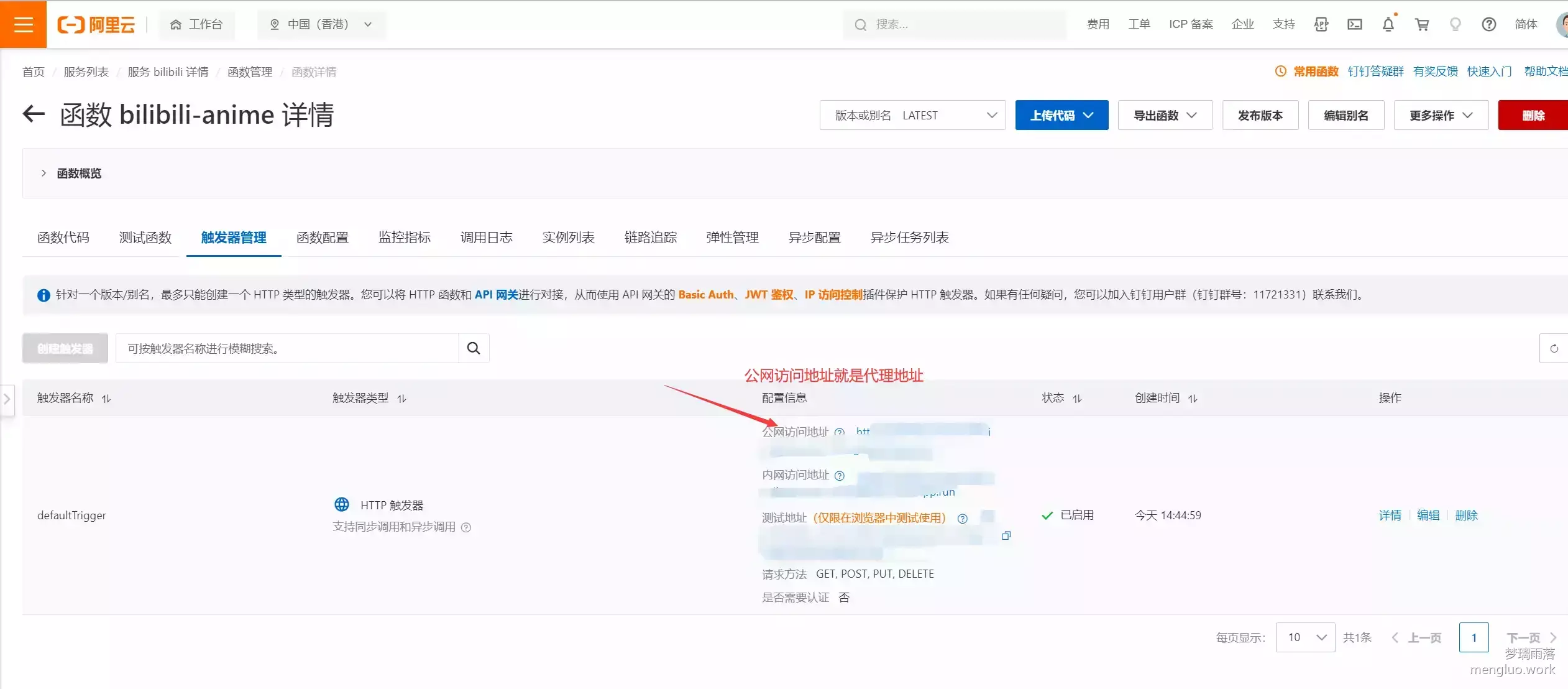 ## 自定义域名 - 在云函数**首页**点击**高级功能-域名管理-添加自定义域名** 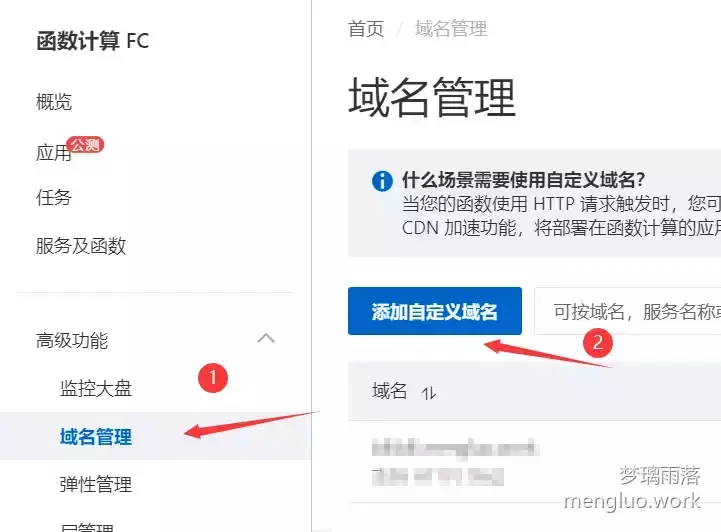 - 输入你要的域名,然后在**路由配置**里选择对应的函数即可(https和cdn加速按照个人需求开启) 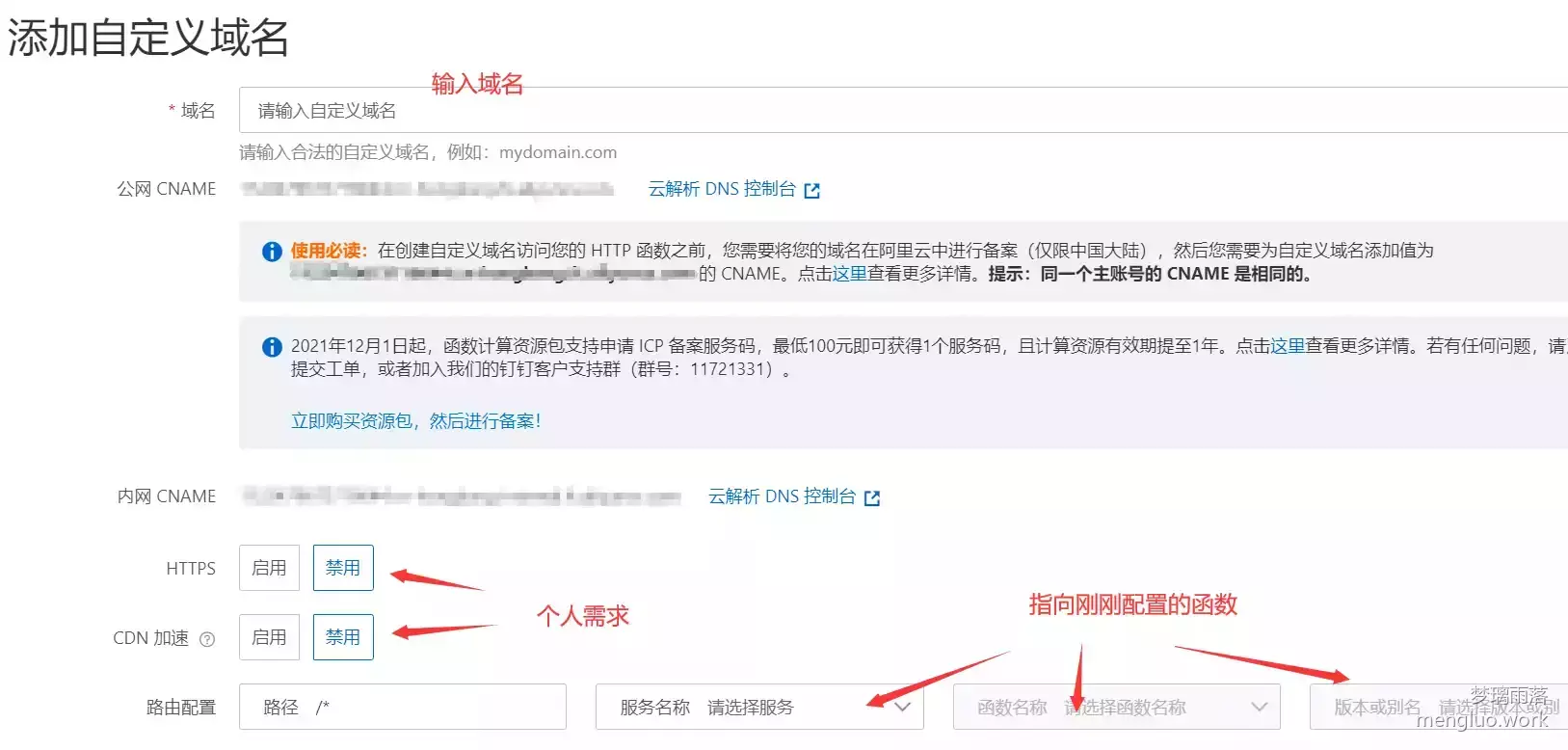 ## 如何使用 ### 网页端 安装[解除b站区域限制](https://greasyfork.org/zh-CN/scripts/25718-%E8%A7%A3%E9%99%A4b%E7%AB%99%E5%8C%BA%E5%9F%9F%E9%99%90%E5%88%B6)油猴脚本,在参数设置里即可使用刚刚创建的**公网访问地址**或者**自定义域名** 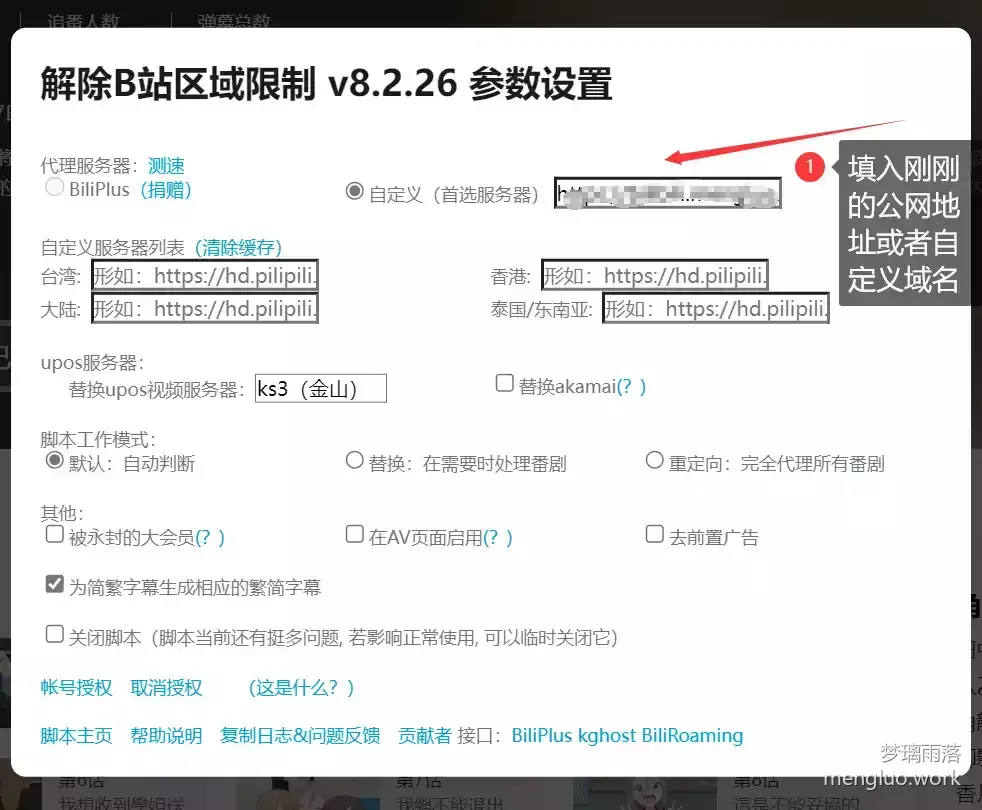 ### 手机端 使用[哔哩漫游](https://github.com/yujincheng08/BiliRoaming)解锁番剧限制,自定义解析服务器 [ghcard path="yujincheng08/BiliRoaming"]/pin/?username=yujincheng08&repo=BiliRoaming[/ghcard]
利用阿里云函数解除b站区域限制
笔记